The way you want it to work
Putting customers first is more than a slogan.
Details
Putting customers first is more than a slogan. We continuously develop the software around the needs and requests of restaurant owners, and help wherever we can.
Less administration. Better service. More possibilities.
Take your business further: work more efficiently, welcome more guests and grow your revenue. Flexible restaurant software tailored to the needs of your venue.
For small and large venues, full-service and quick-service restaurants.


A versatile system, tailored to your needs. Choose your business type, and we’ll highlight the features most relevant to you.









Flexible recipes and inventory, corrections applied retrospectively, less manual work and better information for your decisions.
Putting customers first is more than a slogan.
Manage complex orders efficiently, from product variations and coordinated kitchen stations to straightforward bill splitting.
Leave lengthy restaurant administration behind.
See your restaurant from anywhere, even from Bali.
Waiters have less to remember and less pressure to manage. They can focus on guests, provide friendlier service and earn more tips, which further boosts motivation.
Guests wait less to order, receive their food and pay, and get exactly what they asked for.
Track ingredients, understand profitability, adjust prices and monitor your team. You can see what is happening across your business.
We have a solution for smaller venues with a limited budget too.
The cloud-based system handles NTAK reporting and the associated compliance for you.
Without accurate pricing and visibility into product margins, rising costs can consume your revenue.
Without the right system, it is difficult to see what happens in your restaurant when you are away.
Poor working conditions reduce performance and can eventually lead to staff leaving.
We developed EatWithMe to address these challenges. Small and large venues across Hungary have used it for years.
Manage table and counter orders in the same system, with kitchen preparation, payments, delivery and administration connected to the process.
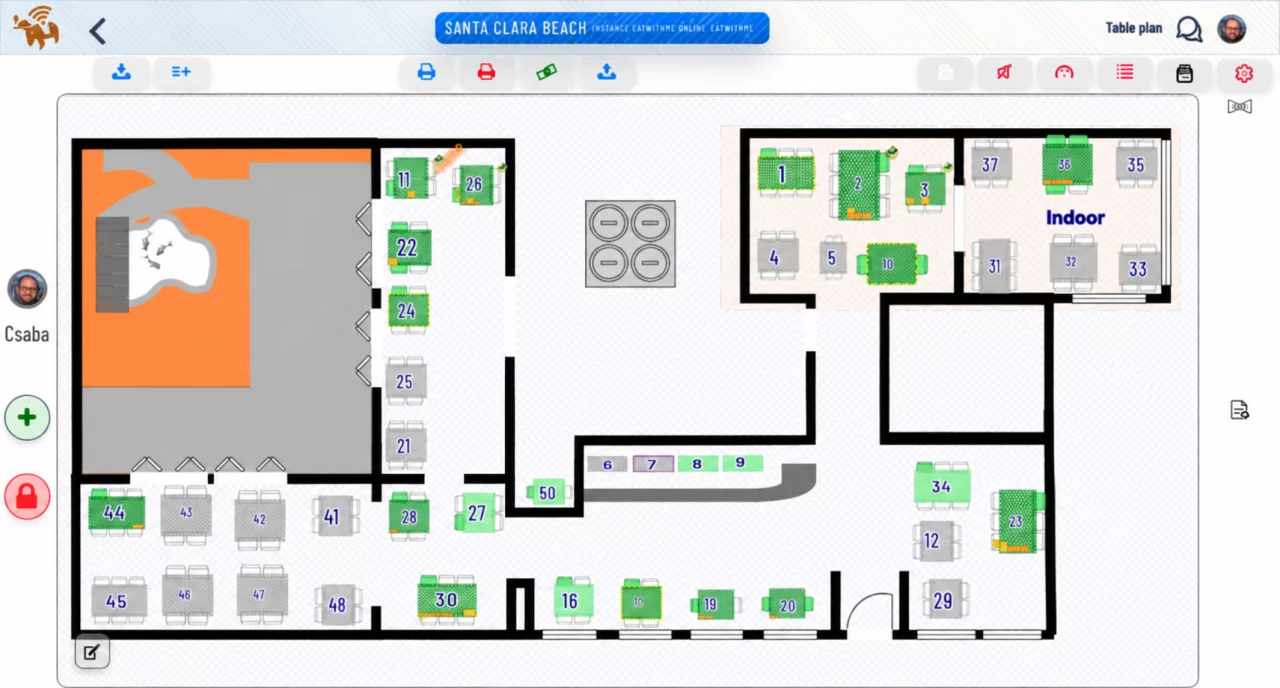
Explore all features →Waiters see table status in real time. Colours and icons provide instant information. Add, remove or disable tables and switch between saved layouts with a click. The table plan actively supports the team with alerts and guidance.
View the information you need on one screen, reducing what staff must remember and eliminating unnecessary switching between screens. See tables across several rooms together with delivery orders from your webshop.
The system alerts staff when an order has not been taken, a dish has not been served, or an order is waiting in the kitchen. This helps less experienced waiters provide a better guest experience.
See at a glance:
Manage orders quickly and accurately, including exceptional requests. Support less experienced staff, send tickets to the kitchen and promote additional purchases on the customer-facing display.
Explore this feature →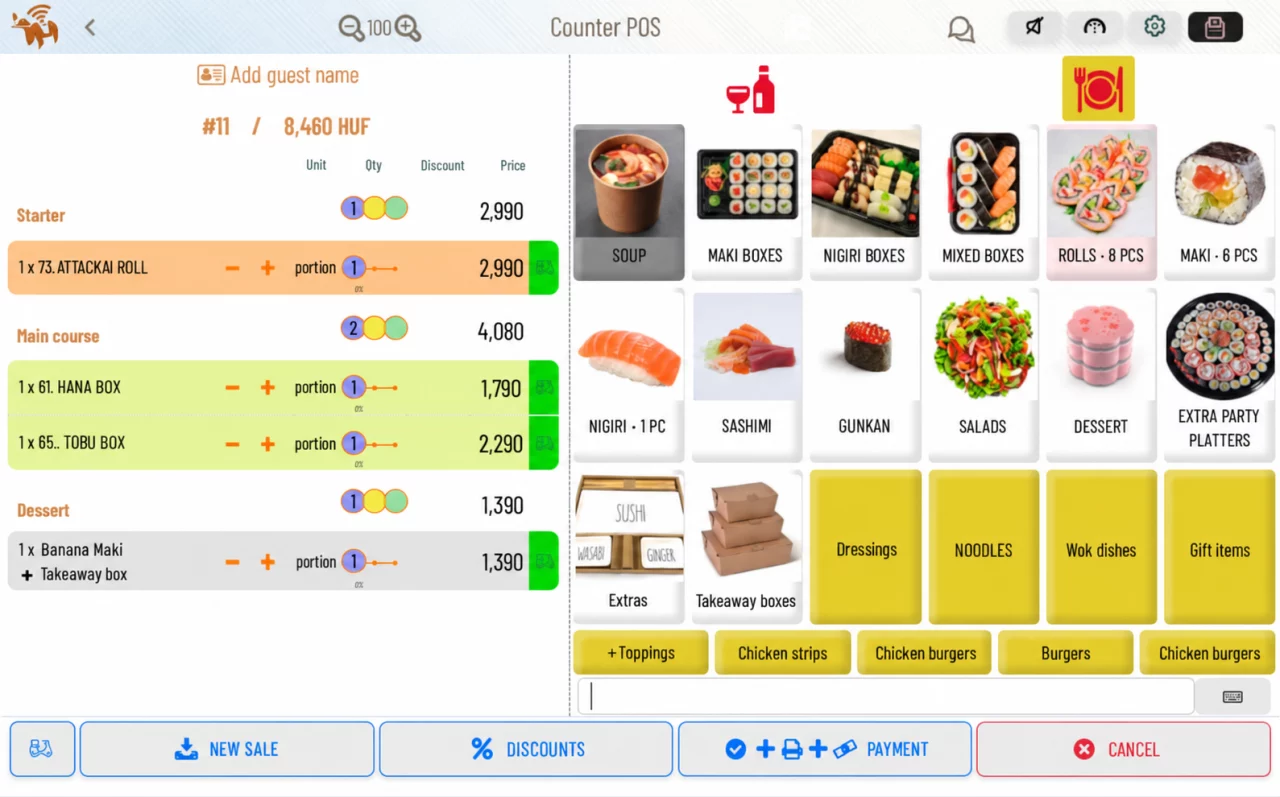
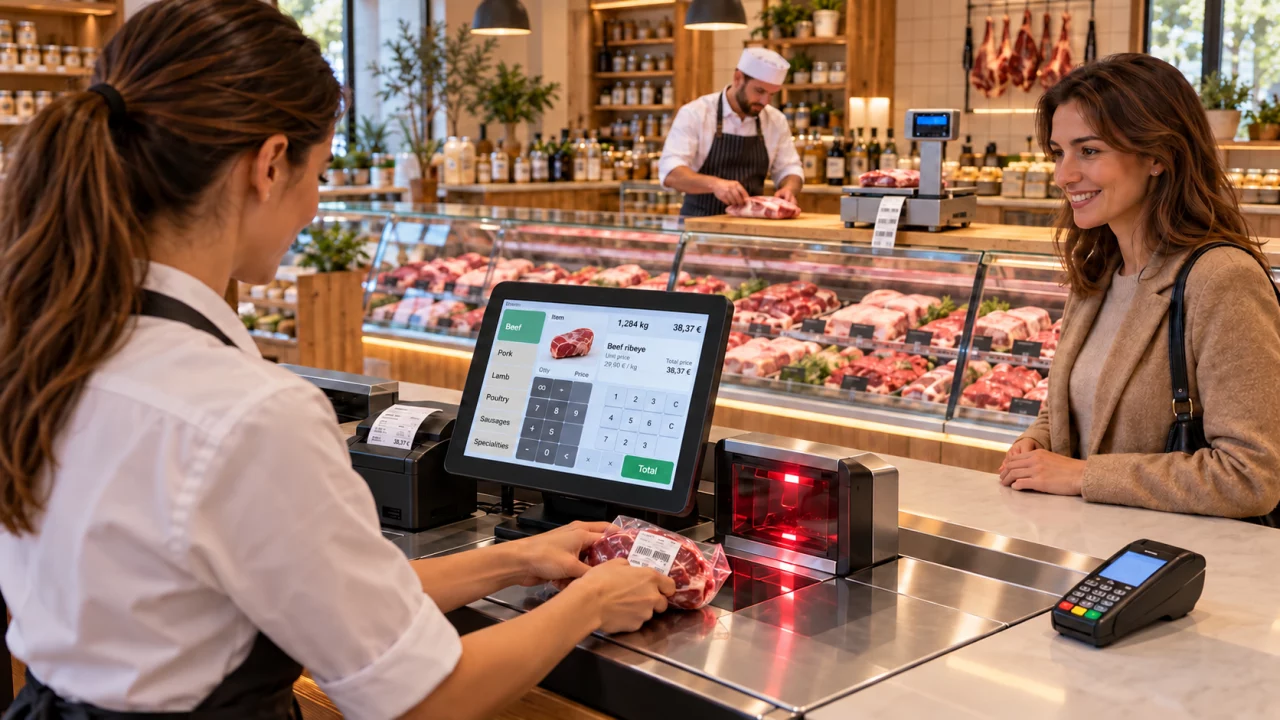
A connected scale helps capture weight and calculate the price. Product variations record individual requests, such as a burger with extra cheese and no onion. Recipe management also tracks the inventory effect of the changed ingredients.
Barcode scanning: scan product barcodes, labels for individually weighed goods and price labels for discounted products. Works with label-printing scales too: scan the barcode on the price label printed by the scale directly at checkout.
Record reservations quickly: enter the time and number of guests, and let the system handle the rest. You can override its suggestions whenever needed.
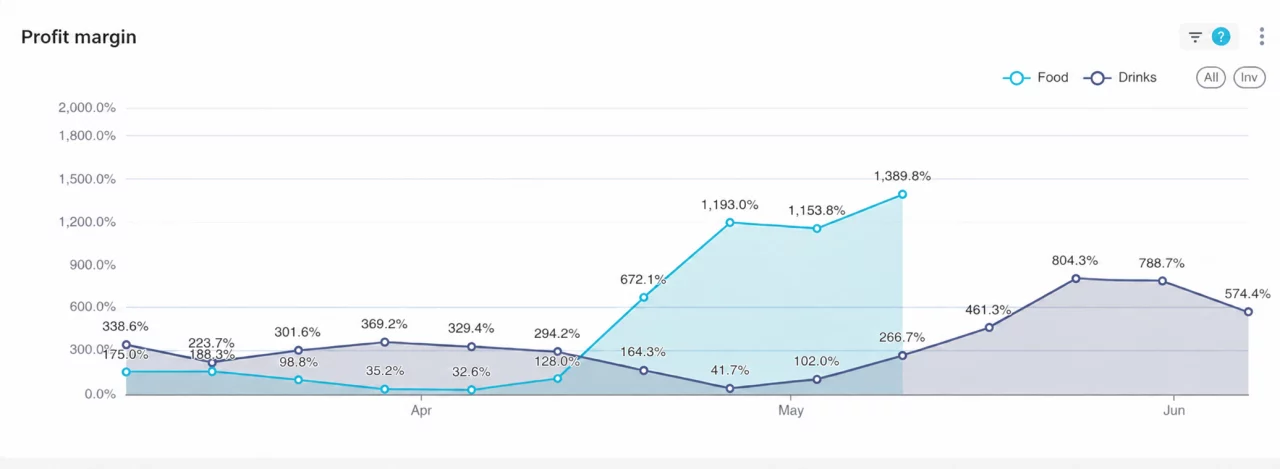
See product margins and ingredient usage clearly. Recipes automatically reduce stock, including modified orders and retrospective entries. No dedicated administrator is required.
Do the administration when it suits you, saving time and reducing errors. Your guests benefit too.
Traditional systems often require administration in a strict sequence. A missing or incorrect entry affects the results and may be difficult to correct retrospectively. This requires dedicated staff and rigid procedures that can get in the way of good service.
In EatWithMe you can amend recipes and goods receipts retrospectively, then recalculate ingredient use and stock. The system recalculates the affected period, even months back, allowing mistakes to be corrected later.
Without a dedicated administrator, you can:
Avoid entering the same order twice. Items already recorded in EatWithMe are passed to the cash register, reducing omissions and entry errors and supporting compliant sales recording.
The range of supported cash registers continues to grow. Current options include: Fiscat, Cashbox, CashCube, Sam4s, Micra-Jota, Sento, Datecs, Flexy
Explore this feature →The system manages stock using your recipes. A digital scale and barcode scanner connected to a computer show the remaining contents of an opened bottle in 1–2 seconds, without measuring jugs or manual stocktaking tools.
These features can otherwise require expensive custom development. EatWithMe makes them accessible at a low cost. The customer database you build can also support cost-effective marketing.
Order at least four major add-on modules alongside the basic package and your webshop is included FREE!
Explore this feature →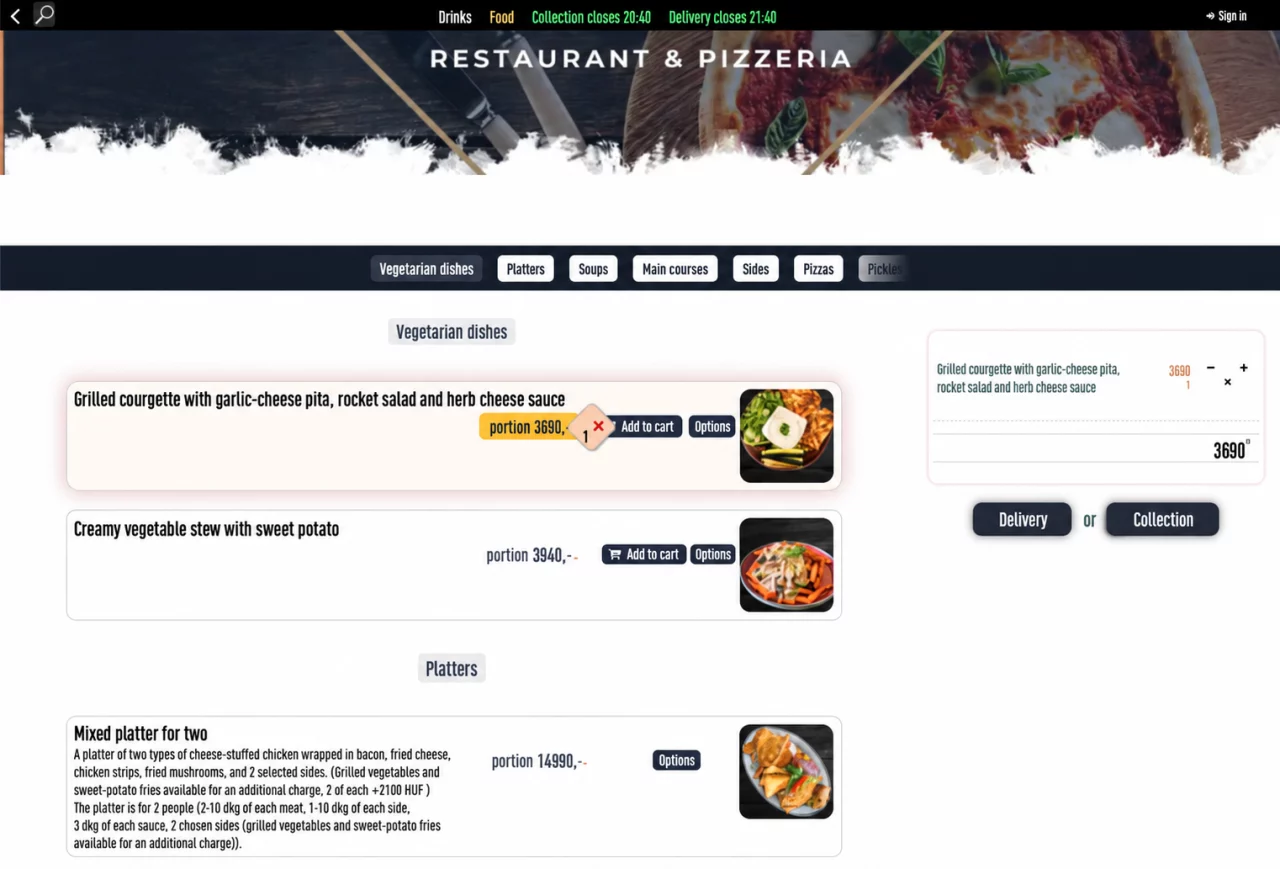
Caller identification: the caller’s name, address and order history help staff take the order. Adhesive package labels: identify the contents and recipient of each package, for example on a pizza box. Wolt Drive: request an external courier to deliver your own orders when no in-house courier is available.
Meal orders arrive through two channels: telephone or your own webshop . The webshop supports weekly meal ordering, so guests can order online for the week ahead. Both channels feed the same system. Use recorded demand to plan purchasing and daily preparation, while the system supports payments and delivery scheduling.
EatWithMe connects to NAV Online Számla using your own access credentials and imports incoming invoices. Filter the invoices and create automatic goods receipts from their items to increase inventory.
Our fully integrated kiosk lets guests order and pay independently, quickly and without queuing.
Behind the scenes, the process supports McDonald’s-style automation:
✅ Kitchen display systems (KDS)
✅ Order handover display
✅ Guest order display
Orders move automatically from kitchen preparation to handover.
🎯 An optional feature lets guests rate individual dishes and service, giving the restaurant immediate feedback.

Update digital price labels in a few taps from your phone.
Explore this feature →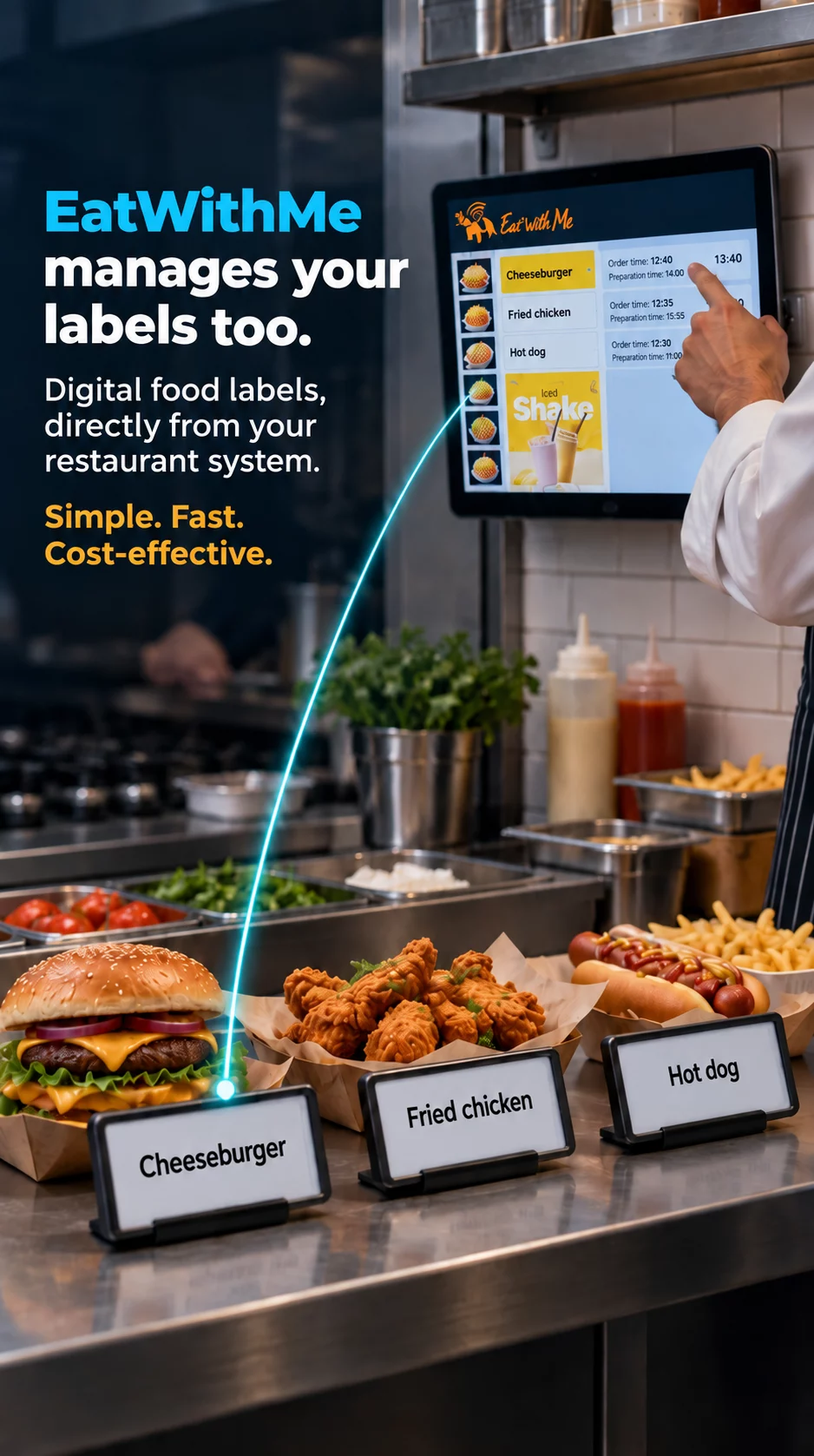
Tickets are tailored to each kitchen station, highlighting the items it must prepare. Starters, mains and desserts are clearly separated, with precise instructions to support the kitchen team.
Explore this feature →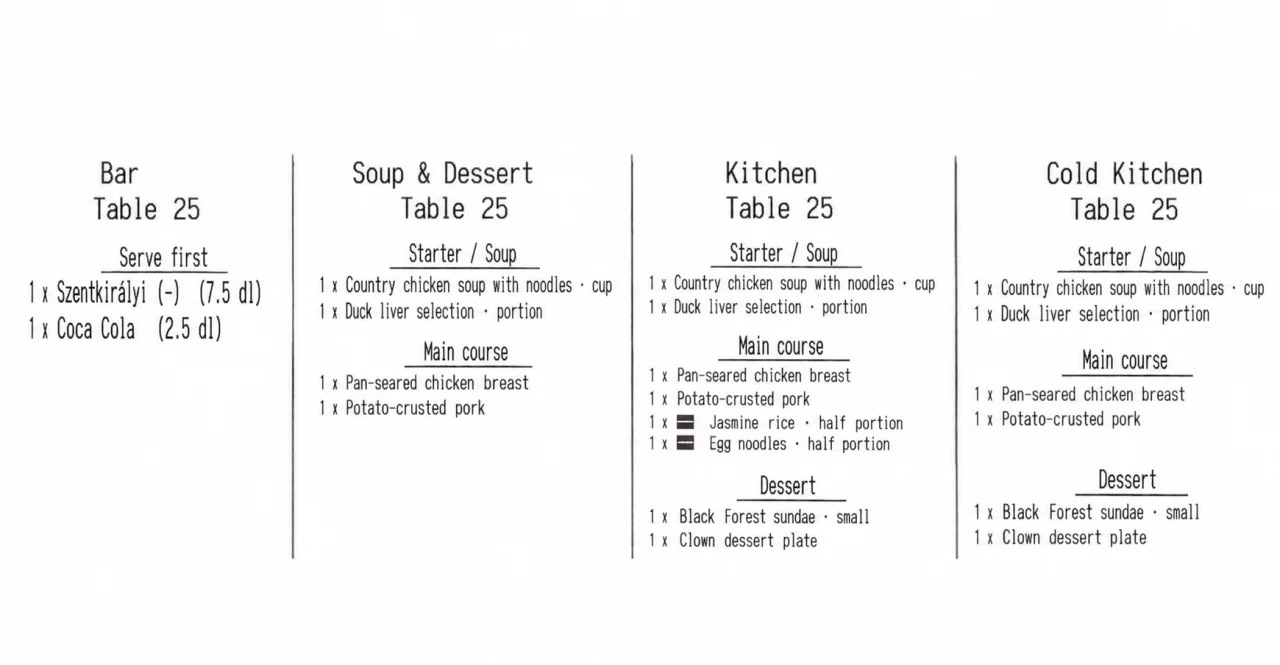
Staff see orders and preparation instructions on a digital kitchen display. Separate tasks by station in multi-station kitchens so each team works on its own items. KDS also coordinates preparation and handover.
Explore this feature →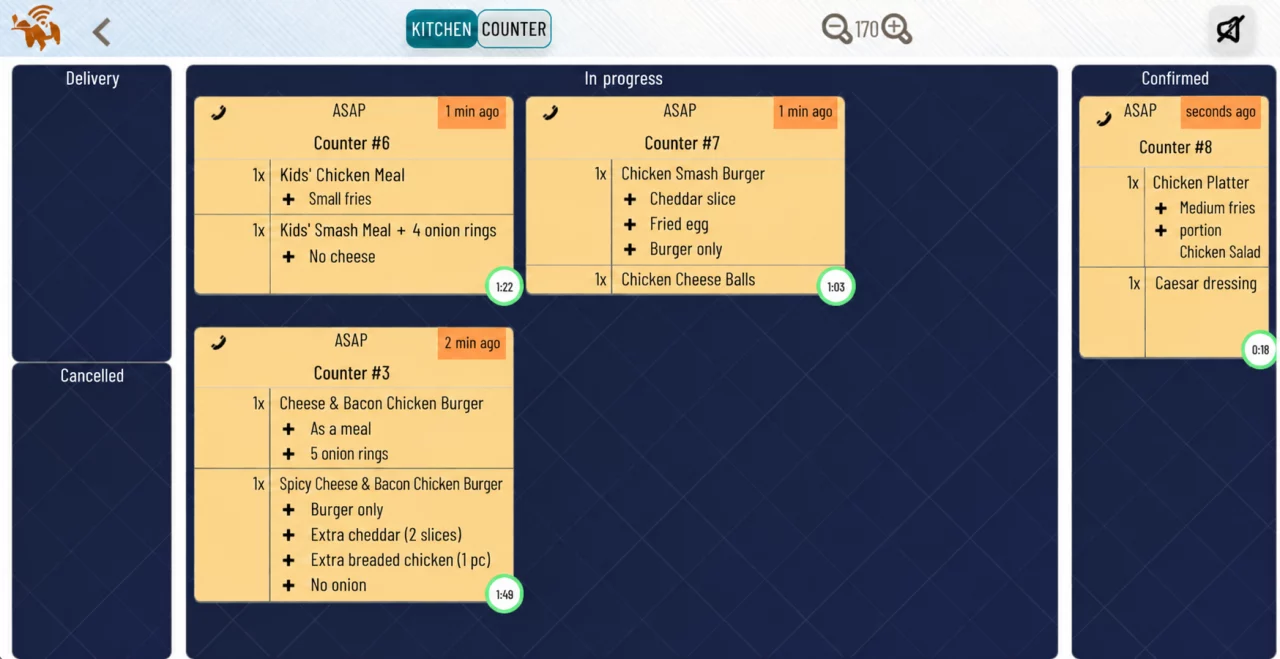
Send each item to the responsible station on a printed ticket or KDS. The handover display helps coordinate collection, and the guest display shows when an order is ready. Guest calling works with counter sales as well as kiosks.
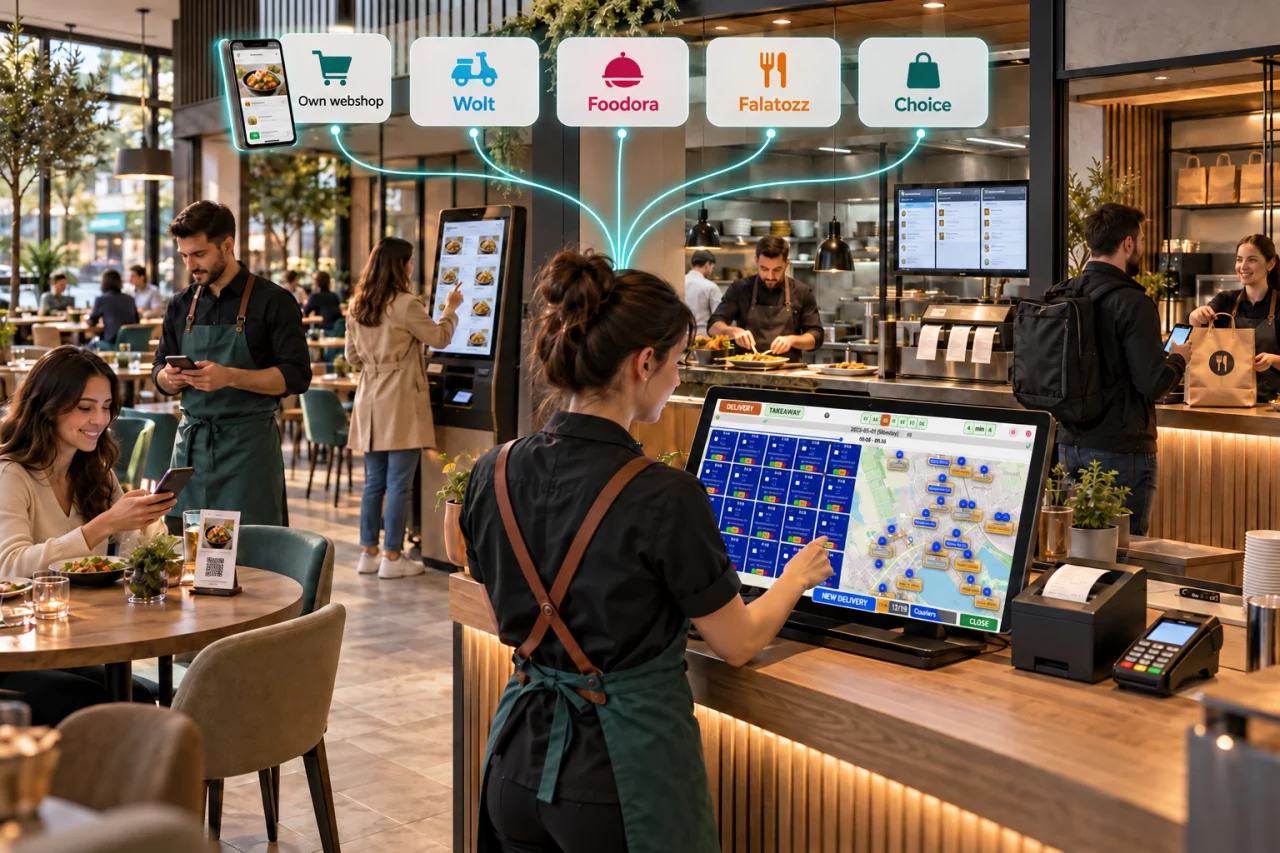
Orders from Wolt, Foodora, Falatozz, Choice and your own webshop come together in EatWithMe. Review, accept and manage them on one screen and follow their status, keeping daily operations clear across multiple channels.
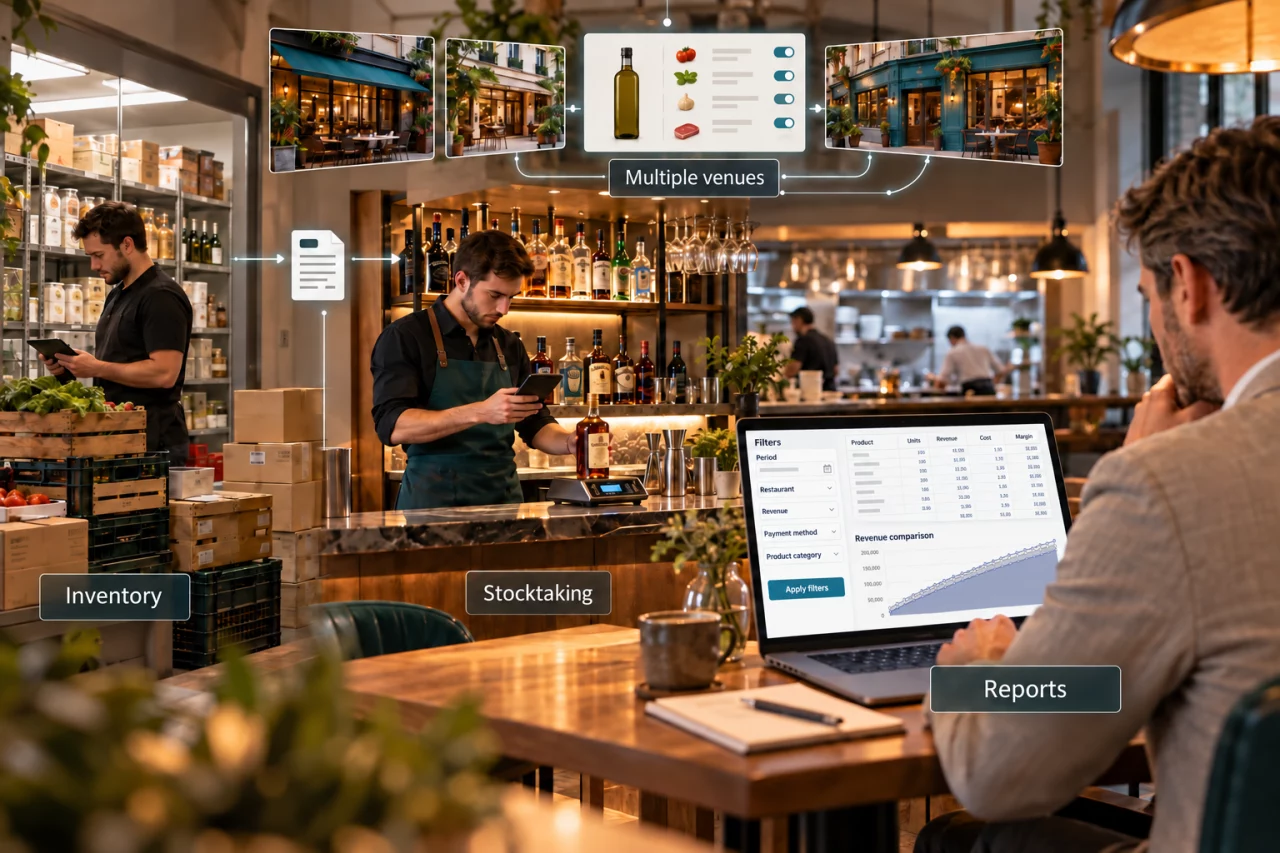
Explore this feature →A shared product catalogue supports the whole network. Centrally managed products, options and recipes can be synchronised selectively to individual venues, so you decide which data each location receives. Report on one venue, several selected venues or the entire network, with individual and combined results.
Sales statistics are powered by a flexible BI module. Build reports around your own questions about sales and margins linked to recipes and inventory. Schedule automatic delivery of your reports so decision-making information reaches you without repeated manual queries.
The EatWithMeQr code belongs to the current guest group and changes for new guests. Once the group leaves, the old code expires, so a saved photograph cannot be used to place orders later. Guests can order several times and settle the whole bill together. They can pay electronically immediately or at the end, or choose cash. QR and waiter orders work together.
Tabletop display, no charging required: show the QR code on an affordable tabletop display. The device needs no charging and can also present daily specials, bringing the current menu and ordering access together.
Fewer separate payments, flexible ordering and access tied to the guest group. Choice ordering and Choice or Qerko payments are also available as separate options.
Reward returning guests with points they can collect and redeem. Add an optional branded guest app alongside your restaurant webshop, allowing guests to place orders. Both the loyalty programme and your own ordering channel support long-term guest relationships.
The mobile waiter supports both iOS and Android. Waiters record orders beside the guest using a phone or tablet. Orders enter the same EatWithMe system that supports kitchen processing. Multiple waiter devices can work together, bringing order entry to the point of service.
EatWithMe automatically sends the amount due to a supported card terminal. A fiscal receipt can be printed after a successful transaction. An optional customer-facing display also offers convenient tip selection. Explore the feature page for compatible terminals.
A dispatcher can assign deliveries, or couriers can claim addresses themselves if configured. In the app they see what to deliver and where, mark deliveries complete and indicate when they are waiting for a job. Live tracking, distance and delivery time help organise operations.
Guests scan a QR code on the bill or receipt to rate dishes and service. Detailed feedback linked to their actual order helps identify what guests enjoy and where operations can improve.
EatWithMe runs on Windows, Android and iOS devices . Add phones and tablets for taking orders, and printers and displays for kitchen work. Guests can order on their own phones or a self-service kiosk.
Explore device placement and sales workflows in hospitality and retail settings.
A compact setup for food stalls, cafés and counters selling by weight.

Counter order → weighing if needed → payment and receipt.
Counter service combined with self-service ordering, digital kitchen workflows and organised handover.

Counter or kiosk → KDS → handover → guest display → collection.
Table service, mobile order taking and QR ordering with a coordinated kitchen. At the drinks bar, use a scale and phone app to count the remaining contents of opened bottles.

Mobile waiter or table QR order → relevant kitchen stations → service → payment.
Add a delivery workspace to the on-site setup. Phone and online orders are managed together.

Phone, own webshop, Wolt, Foodora or Falatozz → shared order management → kitchen → package handover → courier.
The dispatcher assigns deliveries, or couriers claim them depending on your configuration. The app shows the order and destination, supports delivered and waiting-for-work status updates, and enables live tracking. Kiosks and guest displays can also be included for quick-service operations.
A label-printing scale at the butcher counter produces barcode price labels for individually weighed goods. At checkout, scan product barcodes, weight labels and discounted price labels. The scale and barcode scanner can be integrated into the checkout counter.
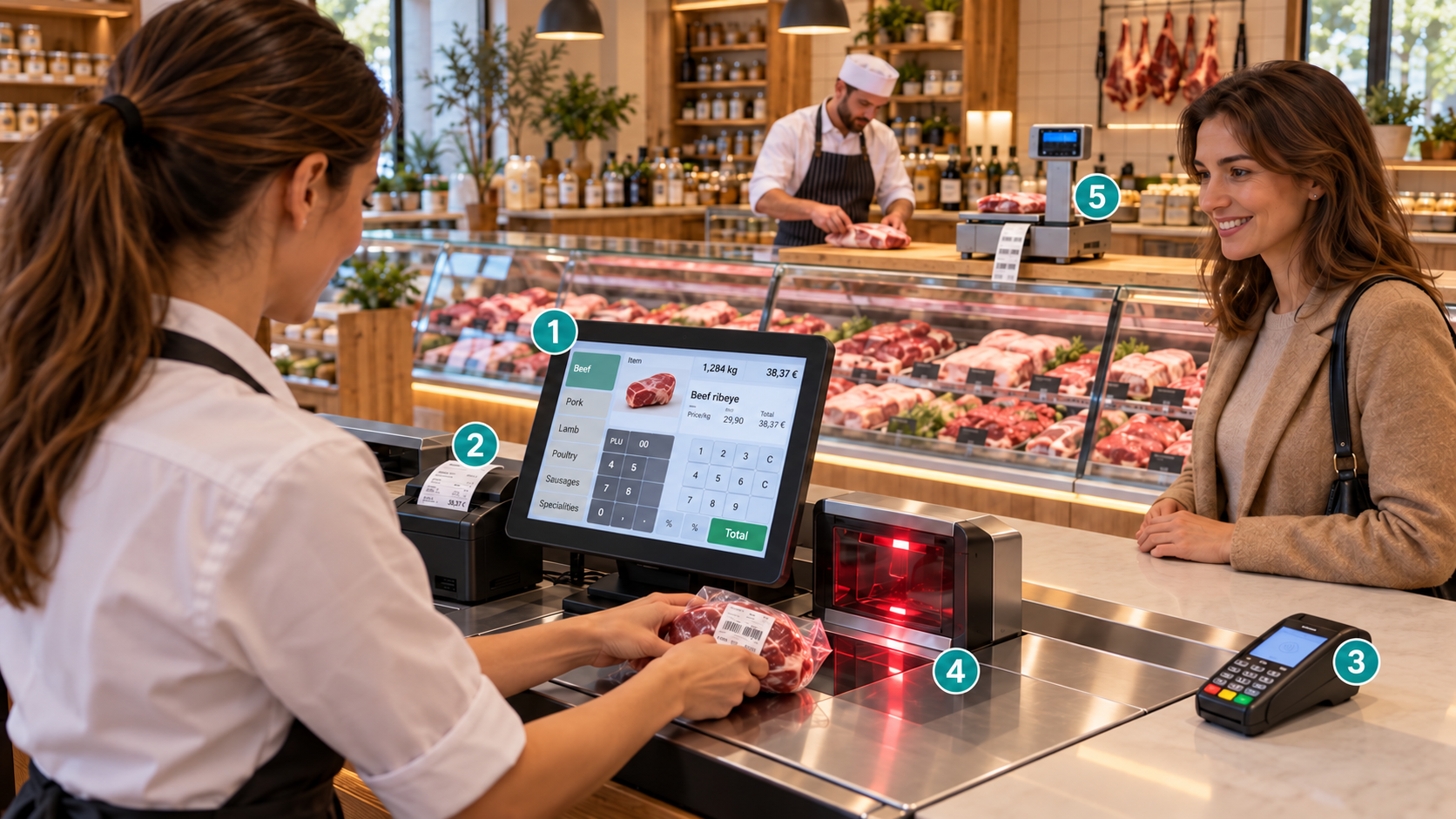
Weigh and label at the butcher counter → scan at checkout → payment and receipt.
The diagram shows device roles and how they work together. We tailor the setup to your workflows and supported device models.
The basic package covers everyday tasks. Add the modules your business needs.
The one-off training and setup fee is HUF 25,000. We explain the system in detail and help you get your own restaurant environment running.
Source equipment from us or another supplier. We can configure the system for you on request.
Order two add-on modules and table reservations are included at no extra charge. Order four and your own webshop is included.
Help choosing the right package →Table plans, multiple payers and bill splitting
Waiters can send orders from a phone or tablet directly at the table.
Fast, accurate weight capture is essential when calculating prices for weighed goods.
Fast and accurate bottle stocktaking.
Record advance table reservations.
Orders from Foodora, Wolt and Falatozz automatically enter your restaurant system.
The system automatically sends the amount to the card terminal and prints the fiscal receipt only after a successful transaction.
Guests scan the QR code on their bill or receipt to rate food and service.
Explore in detail →Enter recipes, goods receipts and stock movements whenever needed, including retrospectively.
Let EatWithMe handle goods receipts.
Automatically print fiscal receipts, speeding up payment and reducing errors that could cause problems during a tax inspection.
Get an affordable restaurant webshop that manages takeaway, delivery and courier status without expensive custom development.
No courier available? Request a Wolt courier with a click.
Track couriers live on a map and view precise delivery data: current locations, distance travelled and delivery speed.
Incoming calls can show the guest’s name, address and order history.
Explore in detail →Manage meal orders received by phone or webshop, including a full week in advance. Plan purchasing, daily preparation, payments and delivery.
An affordable restaurant webshop handles orders from your website and mobile devices.
Let guests order from their own phones at your venue, even if only for drinks.
Let guests order conveniently on kiosks available in different sizes and price ranges.
Selectively synchronise products, options and recipes, and analyse several venues together.
Explore the franchise module →
Csaba Szász
Creator of the EatWithMe restaurant system
We develop around customer feedback and help with everyday use, configuration and interpreting your data.
As a frequent restaurant guest, I have seen many operational problems in restaurants, with and without management systems. Often, I would have spent more if a good restaurant system had supported the team and helped them provide a better guest experience. Too often this did not happen, which benefits neither the restaurant nor the guest.
We created EatWithMe to address these problems and create a win-win situation: happier owners, staff and guests.
This restaurant system is a project we truly care about.
That is why we do everything we can to keep our customers satisfied. For example, interpreting analytics is often easier for us, so we help customers with this even without being asked.
We continuously improve the system using our own ideas and requests from customers. Restaurant owners have recognised many of our developments as major innovations .
We listen carefully to customer problems and requirements and work to find the right solution as quickly as possible.
Seeing our customers’ restaurants succeed is what makes our work rewarding.
Restaurants in Budapest and across the country, in cities and villages, have chosen us.
Our customers include busy restaurants with 40–50 tables, 8–10 waiters and up to five kitchen stations, restaurant and quick-service chains, as well as small cafés and pubs.
Six resellers also help bring EatWithMe to venues and can support you locally.
Six resellers also help bring EatWithMe to venues and can support you locally.
Busy restaurants with 40–50 tables, 8–10 waiters and up to five kitchen stations, restaurant chains, small cafés and pubs use the system. Local resellers can help near you.







Needs assessment, a tailored quote, setup and training. We guide you through the process.
We discuss your venue and requirements by phone or email. If you wish, we demonstrate the system in a live online session lasting about an hour. We recommend this to give you a complete picture, and can assess your needs during the demo.
After assessing your needs and obtaining your business details, we email a personalised quote including any required hardware. We answer remaining questions so you can decide whether to try EatWithMe. You can accept the quote online and pay the initial fees by bank transfer.
We create your dedicated restaurant environment in the cloud. You then have a virtual restaurant even without hardware. Register, sign in and begin using your own software environment.
Once your environment is ready, we provide online training in how to use the system, typically over two sessions. We remain available for questions and support afterwards. We guide you through getting started rather than leaving you with a manual.
You can configure the system yourself. Smaller venues with fewer features usually need less time. Larger venues with multiple table layouts and recipes require more configuration. If you would rather not spend time on this, we can do it for you.
If you order equipment from us, we ship or deliver your terminals, computers, touchscreens, tablets, printers and cash registers. We then configure printing remotely and set up the equipment needed for smooth operation.
If your waiters need another short 15–30 minute training session using your finished setup, we can arrange it. Spend some time trying the system before going live. Once ready, start using it in daily operations. 🙂
EatWithMe is designed for security and high availability. If a software service fails, a backup system takes over to keep your restaurant, café, bar or other venue running.
Use your phone’s mobile hotspot and connect the restaurant devices to it. EatWithMe uses very little data, allowing you to continue operating over mobile internet.
Continue using EatWithMe on a phone or tablet. Even if the kitchen stops, you can still see what guests have consumed and settle their bills rather than losing revenue.
Prepare a backup connection with another provider, for example mobile internet alongside a wired subscription. A router with automatic failover can switch to the backup connection when the primary service fails.
Yes. EatWithMe supports table service, simple counter sales and combinations of both. Our tablet-and-cash-register setup is designed specifically for smaller venues with limited budgets.
There is a one-off HUF 25,000 setup and training fee. You also need any equipment you will use, sourced from us or another supplier. After that, the recurring software cost is the monthly fee.
We can handle the full configuration for you if you ask us to.
Yes. EatWithMe routes multi-station orders intelligently. Kitchen tickets are tailored to each station, highlighting its tasks and separating starters, soups, mains and desserts. Clear instructions reduce mistakes and help guests receive exactly what they ordered.
Yes. Sign in to your restaurant environment and see what is happening without manually synchronising data, even from the other side of the world.
Still have questions? Email info@eatwithme.hu ; we reply within 1–2 working days.
In an online demo lasting about an hour, we show the solutions relevant to your business. Our blog contains customer stories and detailed feature explanations.
The linked blog articles are currently available in Hungarian.
Help us prepare: tell us about your requirements in the feature recommender before booking a demo or requesting a quote.
Tell us what I need →See live how the system supports your daily operations.
Book a free demoYou can request a quote without a demo. Tell us what you need.
Request a tailored quoteYou can also try the demo system independently: Register for the demo →
Any questions? info@eatwithme.hu · +36 30 269 87 91